Record Type Id Mapping
When importing records into a Salesforce object that uses Record Types, the RecordTypeId field must contain a valid
Salesforce Record Type Id (a 18-character ID starting with 012). Quick Loader removes this requirement — you can
provide a Record Type Developer Name or Label instead and Quick Loader will resolve the correct Id
automatically.
How It Works
When Quick Loader processes a field mapped to RecordTypeId, it checks whether the source value is already a valid
Record Type Id. If it is not, it looks up the Record Types available for the target object and matches against:
- Record Type Id — the 15 or 18-character Salesforce Id (passthrough, no resolution needed)
- Developer Name — the API developer name (e.g.
Enterprise_Account) - Label — the user-facing name (e.g.
Enterprise Account)
Matching is case-insensitive for Developer Name and Label. The resolved Id is what gets sent to Salesforce.
Setup
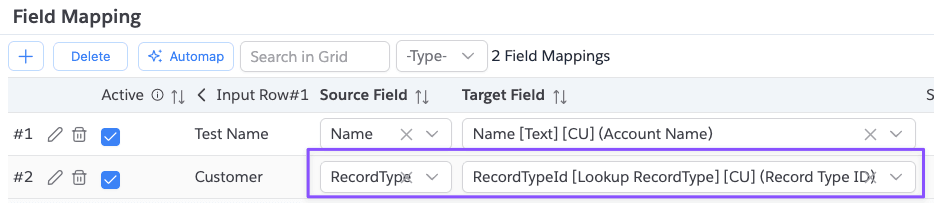
No special configuration is needed. Simply map your source column to the RecordTypeId target field in
the Field Mapping dialog. Quick Loader detects that the target field is RecordTypeId and performs
resolution automatically.
Example
Given an object with these Record Types:
| Record Type Id | Developer Name | Label |
|---|---|---|
0124x000000AbCdAAA | Enterprise_Account | Enterprise Account |
0124x000000XyZaAAA | Partner_Account | Partner Account |
All three of these source values will resolve to the same RecordTypeId:
| Source Value | Resolves To |
|---|---|
0124x000000AbCdAAA | 0124x000000AbCdAAA |
Enterprise_Account | 0124x000000AbCdAAA |
Enterprise Account | 0124x000000AbCdAAA |
Error Handling
If a value in the RecordTypeId column does not match any Record Type Id, Developer Name, or Label for the target
object, the record is marked as errored with a message like:
Invalid record type mapping for field [RecordTypeId]. Value [Unknown_Type] did not match Record Type Id, Developer Name, or Label for object [Account]
Fix the value in your source data (or in the input grid) and use Run Import (Retry) to reprocess only the errored rows.
Notes
- Resolution is performed per-row, so you can mix Ids, Developer Names, and Labels in the same column.
- Blank values are passed through as-is (no resolution attempted, no error raised).
- Record Type availability depends on the target object — only Record Types defined for that object are considered.