Field Mapping
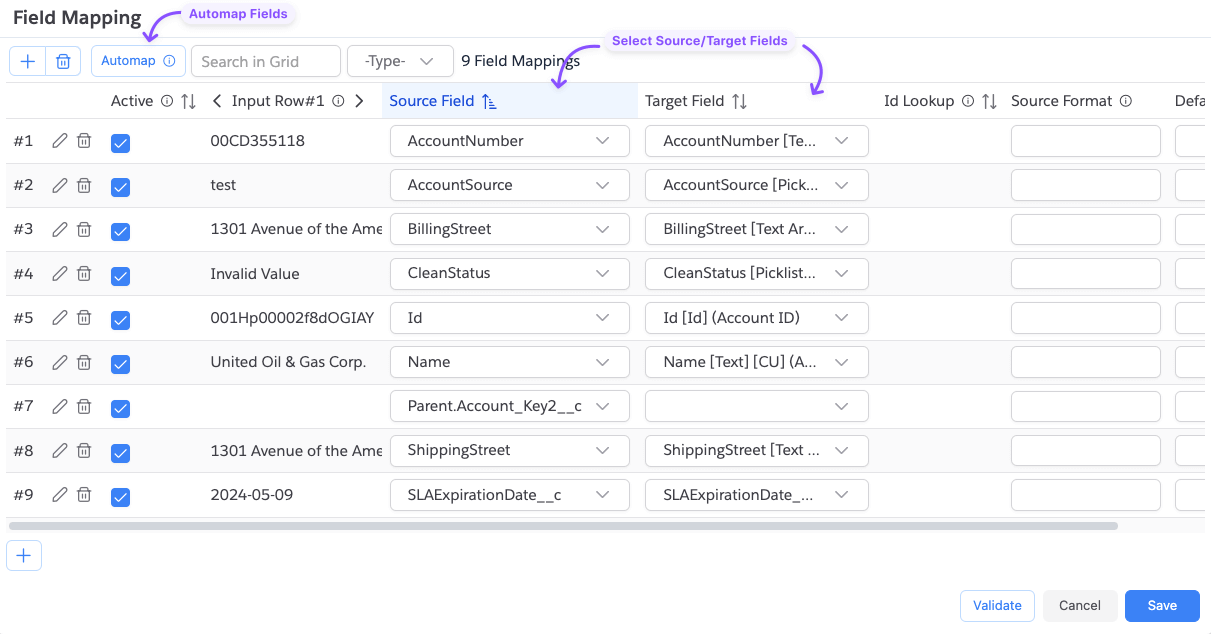
Field Mapping tells Quick Loader how to map the columns in your input file to the fields on the target Salesforce object. When you select an input file and object, Quick Loader auto-maps matching fields from exact match down to partial match.
Click the Field Mapping button to open the Field Mapping dialog.
- You can map the same input field to multiple target fields, but you cannot map multiple input fields to the same target field.
- If you leave the target field blank, that mapping is skipped.
Active/Inactive Mapping
Each mapping row has an Active checkbox. Uncheck it to temporarily disable a mapping without deleting it.
Date / DateTime Fields
Salesforce expects dates in ISO 8601 format:
- Date:
yyyy-MM-dd(e.g.2025-12-31) - DateTime:
yyyy-MM-ddTHH:mm:ssZ(e.g.2025-12-31T13:14:15Z)
If your input data uses a different format, set the Source Format field on the mapping row. Quick Loader will parse the value using that format before sending it to Salesforce. Format tokens follow the same convention as the parse_date formula function.
If you have multiple date/datetime fields that all use the same non-standard format, set the Default Date Format or Default DateTime Format in Save Options instead of configuring each field individually.
Format token casing matters:
M= month,m= minutesH= 24-hour clock,h= 12-hour clock
Using the wrong case will produce incorrect results.
Format examples:
| Source Format | Example Input |
|---|---|
yyyy-M-d | 2025-2-3 |
yyyy-MM-dd | 2025-12-31 |
MM/dd/yyyy | 12/31/2025 |
dd-MM-yyyy | 31-12-2025 |
MM/dd/yyyy HH:mm:ss | 12/31/2025 13:14:15 |
dd-MM-yyyy HH:mm:ss | 31-12-2025 13:14:15 |
MM/dd/yyyy hh:mm:ss a | 12/31/2025 01:14:15 PM |
dd-MM-yyyy hh:mm:ss a | 31-12-2025 01:14:15 PM |
MM/dd/yyyy hh:mm:ss a Z | 12/31/2025 01:14:15 PM +0530 |
MM/dd/yyyy hh:mm:ss a ZZZZ | 12/31/2025 01:14:15 PM +05:30 |
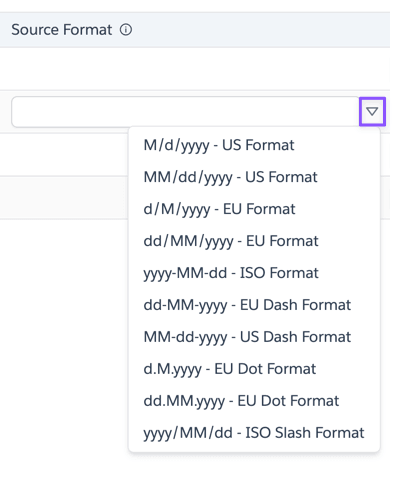
You can also pick from the list of format presets.
Boolean Fields
The following input values are treated as false (case-insensitive): <blank>, null, false, no, 0, 0.0.
All other values are treated as true.
Default Values
Use the Default Value field on a mapping row to set a fixed value for a field, or to fall back to a value when the source is blank.