Refreshing Metadata
Brobench caches Salesforce metadata locally so Objects, Fields, Query content assist, and other features can open quickly and it also saves API calls. Metadata caches are stored per connection and normally expire after seven days or when new version of Brobench is released.
If you recently created, renamed, or deleted an object or field, refresh metadata before continuing so Brobench uses the current Salesforce schema.
Ways to refresh metadata
Refresh the Objects list
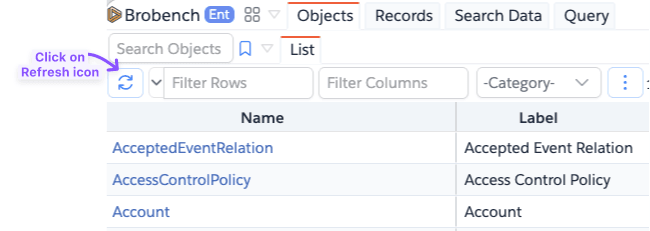
Open App Menu -> Tools -> Objects, open the List tab, and click the Refresh icon in the Objects grid toolbar.
This forces Brobench to reload the object list and is the usual choice after adding or removing an object.
Refresh the Objects Fields
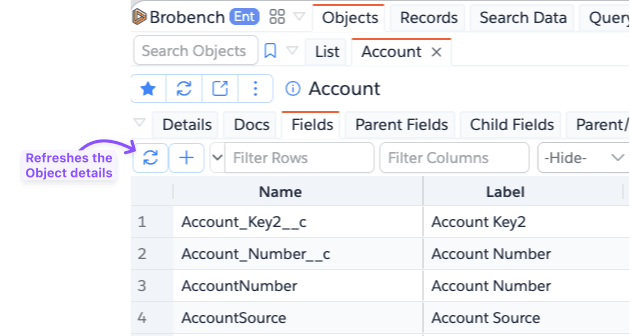
When you are in an object, if you want to refresh its fields, click on the Refresh icon in the Fields tab.
Refresh while executing a query
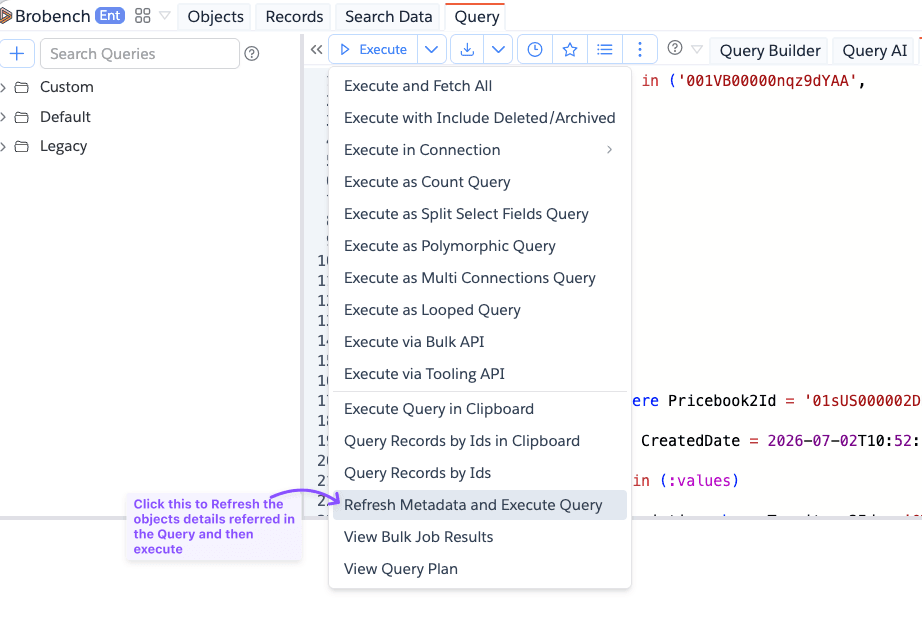
In Query, open the dropdown next to Execute and choose Refresh Metadata and Execute Query. Brobench refreshes the objects referenced by the query, including objects in parent and child relationships, and then executes the query.
Use this option when a query reports an unknown field or object immediately after a schema change. It refreshes only objects used by that query; unrelated cached metadata remains unchanged. See Refresh Metadata and Execute.
Use a feature's Refresh action
Many metadata views have their own Refresh icon, including Metadata Studio, Metadata Compare, Object Parent/Child, and list-view panels. These actions force that view to reload its relevant metadata; they do not necessarily clear every metadata cache for the connection.
Clear all local cache
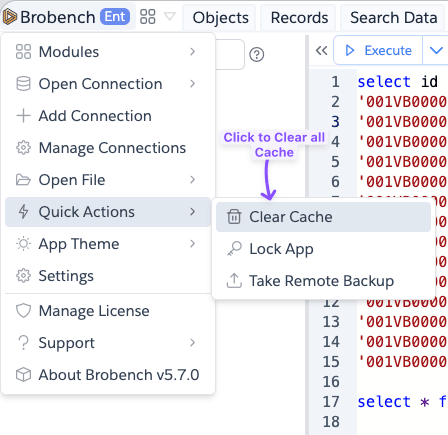
Open the Brobench menu, choose Quick Actions -> Clear Cache, and confirm. This clears Brobench's local caches,
including cached metadata files for all connections. Use it when targeted refreshes do not resolve stale data; the next
feature you open will fetch the required data again.
- Refreshing metadata does not change Salesforce metadata; it only reloads Brobench's local copy.
- Refresh actions are connection-specific. Repeat the refresh for each connection where metadata changed.
- A refresh may take longer than opening cached data because Brobench must call Salesforce again.
- If the Salesforce user cannot see a new object or field, refreshing cannot make it available; check Salesforce permissions and API availability.