View Record Activity
The Activity tab provides a unified timeline of all activities associated with a record, including field changes, tasks, events, emails, attachments, files, and voice calls. It also offers a Users view to see which users have interacted with the record and how often.
Opening the Activity Tab
Open any record and click the Activity tab in the Record Detail Tabs section.
Overview
Here is what the Activity tab looks like.
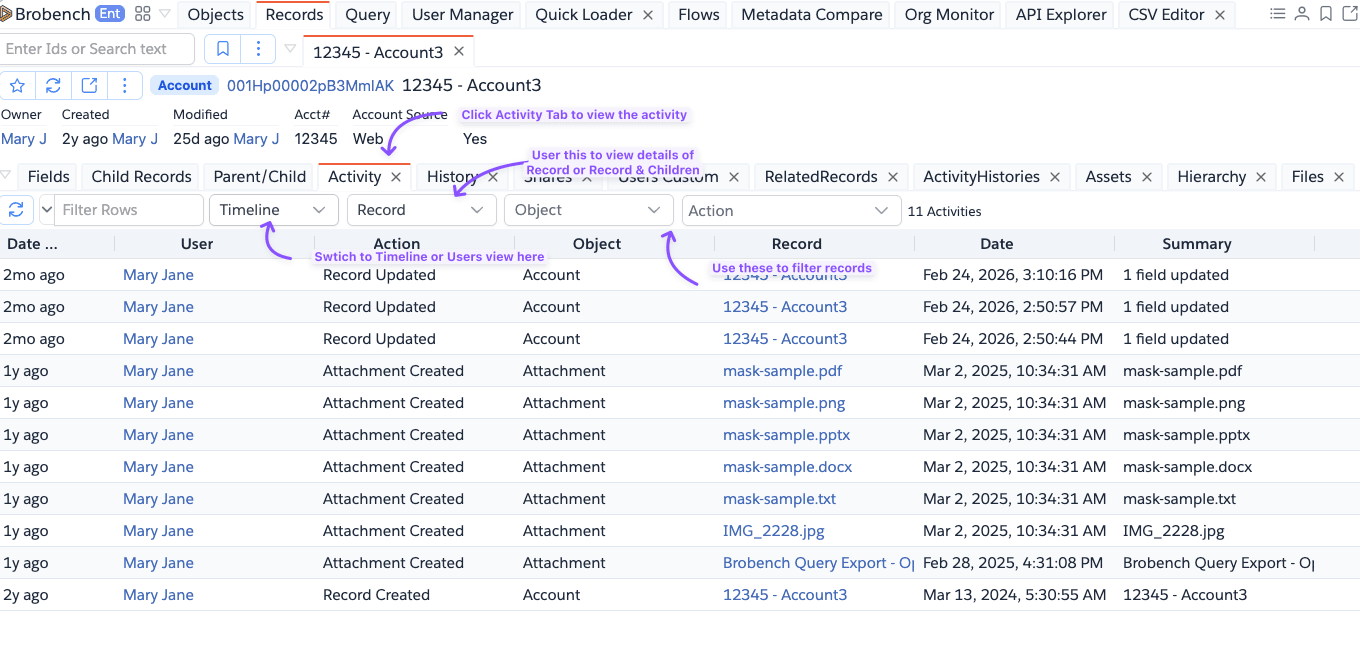
The Activity tab supports two views, selectable from the View dropdown in the toolbar.
Timeline View
Displays all activity events in reverse-chronological order. Each row represents a single activity event.
| Column | Description |
|---|---|
| Date Relative | How long ago the activity occurred (e.g., "3 days ago") |
| User | The user who performed the action |
| Action | The type of activity (see Activity Types) |
| Object | The Salesforce object type the activity is associated with |
| Record | The specific record the activity is on |
| Date | The exact date and time of the activity |
| Summary | A short description of the activity |
| Details | Additional context (e.g., task status, file type) |
Users View
Aggregates the timeline by user, showing a summary of each user's interaction with the record.
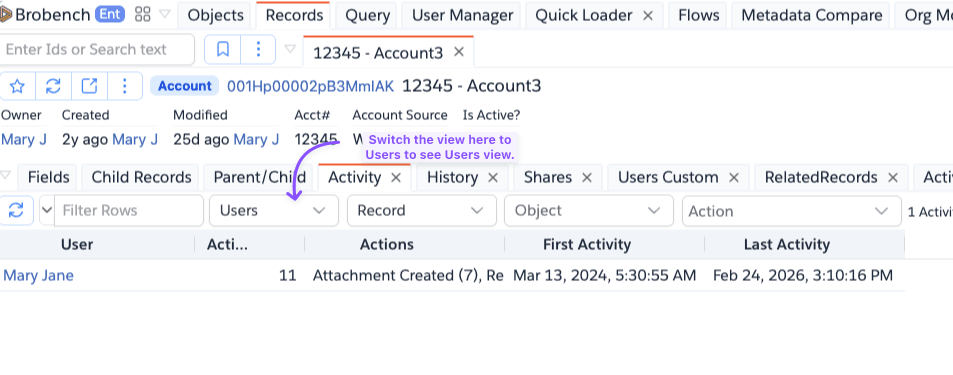
| Column | Description |
|---|---|
| User | The user who performed activities |
| Actions | Total number of activity events by this user |
| Actions | List of action types with counts (e.g., "Record Updated (5), Task Created (2)") |
| First Activity | Date and time of the user's earliest activity |
| Last Activity | Date and time of the user's most recent activity |
Filters
Use the toolbar filters to narrow down the activities shown.
| Filter | Description |
|---|---|
| View | Switch between Timeline and Users views |
| Child Level | Record — shows activity only for the current record. Record & Children — also includes activity from all direct child records. |
| Object | Filter to a specific object type (populated dynamically from the loaded activities) |
| Action | Multi-select filter to show only specific action types. Automatically adjusts when Object changes. |
Activity Types
The Activity tab collects events from multiple Salesforce sources.
| Activity Type | Actions Shown | Source |
|---|---|---|
| Record Created | Record Created | CreatedDate on the record |
| History | Record Updated | Field History object |
| Task | Task Created, Task Updated | Task child relationship |
| Event | Event Created, Event Updated | Event child relationship |
| Email Created, Email Updated | EmailMessage child relationship (root record only) | |
| Attachment | Attachment Created, Attachment Updated | Attachment child relationship |
| File | File Uploaded | ContentDocumentLink relationship |
| Voice Call | Voice Call Created, Voice Call Updated | VoiceCall child relationship |
Notes
- The Record & Children scope traverses all browsable child relationships one level deep. For large records with many children this may take a moment to load.
- Email activities are only collected for the root record, not child records, even when Record & Children is selected.
- Field history entries that represent record creation are excluded from the timeline to avoid duplication with the * Record Created* event.
- File activities reflect the latest published version of the content document.
- If a selected Object filter no longer matches any loaded activities (e.g., after switching Child Level), the filter is automatically cleared.