Record Parent/Child Browser
Parent/Child Browser lets you drill from any record into its full relationship graph — navigating parent lookups and child relationships level by level, as deep as you need to go. Where the standard Child Records tab shows immediate level of related records, Parent/Child Browser gives you an interactive tree you can keep expanding in any direction.
It is available as the Parent/Child tab when viewing a record.
Overview
Check out the similar feature called Object Parent/Child browser which shows the defined metadata relationships.
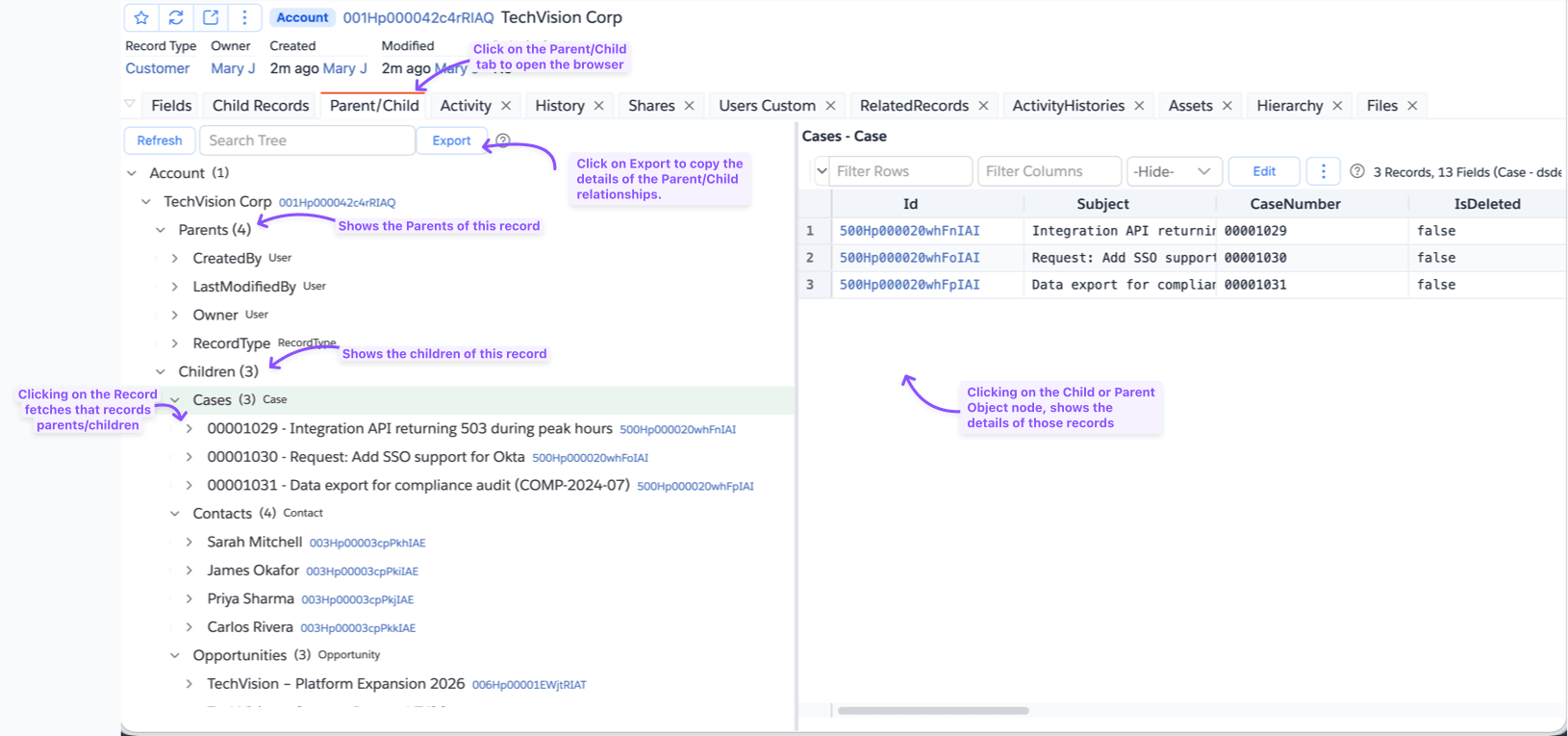

The tab is split into two panes:
- Left — a tree showing the record's relationship hierarchy, expandable level by level
- Right — a data grid showing the full record data for whatever node you select in the tree
Navigating the Tree
Each record node in the tree expands into two folders:
- Parents — all parent (lookup/master-detail) relationships and the records they point to
- Children — all child relationships, each showing the number of related records
Expand a Parents folder to see each parent relationship by name. Expand a relationship node to see the actual parent record. Expand that record to continue navigating its own parents and children.
Expand a Children folder to see each child relationship by name along with its record count. Expand a relationship node to load the child records. Each child record can then be expanded further in the same way.
There is no fixed depth limit — you can keep drilling down through as many levels as needed.
Selecting Nodes
Clicking a node updates the right-side data grid:
| Node type | What the grid shows |
|---|---|
| Individual record | Full field values for that record |
| Parents folder | All parent relationship groups for that record |
| Children folder | All child relationship groups for that record |
| Child relationship node | All child records for that relationship |
Tree Controls
| Control | Description |
|---|---|
| Refresh | Reloads the entire tree from Salesforce |
| Search | Filters visible nodes in the tree by name |
Exporting the Hierarchy
Clicking the Export button to download the dependencies hierarchy as text tree. For example:
Broker__c
└── Caroline Kingsley
    ├── Children (1)
    │   └── Properties__r
    │       ├── Seaport District Retreat
    │       │   ├── Children
    │       │   └── Parents (4)
    │       └── Stunning Victorian
    │           ├── Children
    │           └── Parents (4)
    └── Parents (3)
        ├── CreatedBy
        │   └── Mary Jane
        ├── LastModifiedBy
        │   └── Mary Jane
        └── Owner
            └── Mary Jane