View Record Hierarchy
The Hierarchy tab on the Record Details page shows where the current record sits within its object's hierarchy
tree. It works for any object that has a self-referencing lookup field — most commonly User (via ManagerId),
Account (via ParentId), and Case (via ParentId).
The tree loads automatically when the tab is opened. It starts from the root of the hierarchy and expands all levels so you can see the full picture at once.
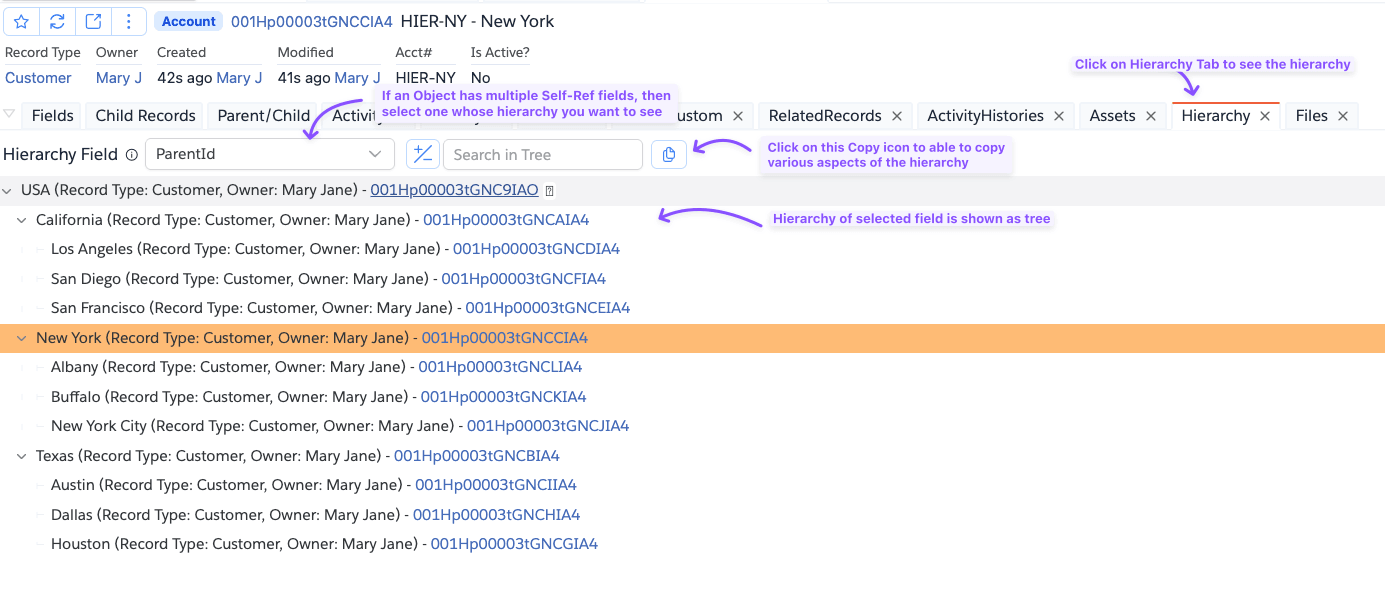
Hierarchy Field
Objects with more than one self-referencing field show a Hierarchy Field dropdown at the top of the tab. Select the field whose hierarchy you want to browse. Changing the selection reloads the tree for that field.
Browsing the Tree
Each node in the tree shows the record name along with contextual details:
- User hierarchy — Title and Department are shown alongside the name
- All objects — Record Type and Owner are shown if set
The current record you opened is highlighted in the tree so you can orient yourself in a large hierarchy.
Use the Expand/Collapse All toggle to open or close all nodes at once. You can also type in the search box to filter nodes by name.
Copy Actions
Click the copy icon button in the toolbar to open the copy menu. All actions copy to the clipboard.
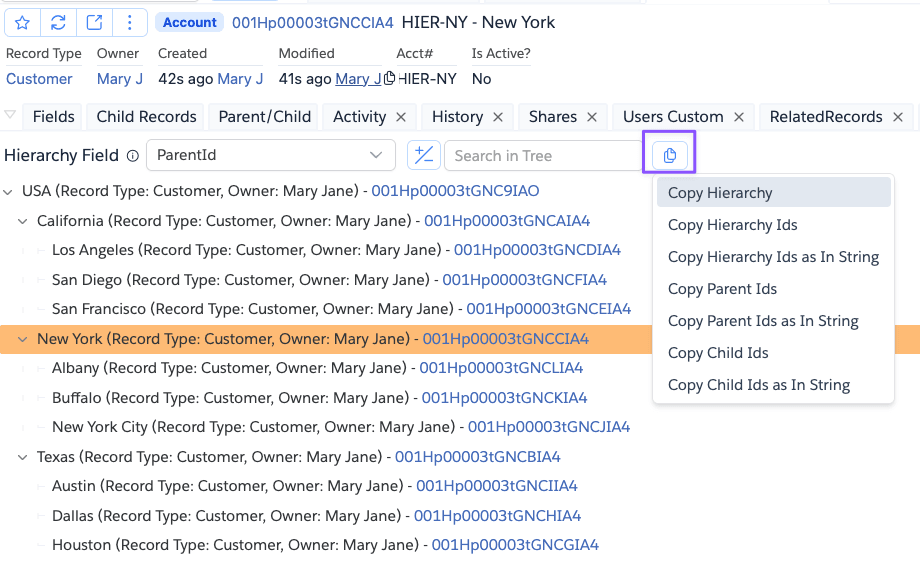
| Action | What it copies |
|---|---|
| Copy Hierarchy | The full tree as an ASCII diagram, including names, contextual details, and IDs |
| Copy Hierarchy Ids | All record IDs in the tree, one per line |
| Copy Hierarchy Ids as In String | All IDs formatted as a SOQL IN clause |
| Copy Parent Ids | IDs of all ancestors of the current record (records above it in the hierarchy), one per line |
| Copy Parent Ids as In String | Ancestor IDs formatted as a SOQL IN clause |
| Copy Child Ids | IDs of all descendants of the current record (records below it in the hierarchy), one per line |
| Copy Child Ids as In String | Descendant IDs formatted as a SOQL IN clause |
Parent and Child are always relative to the record you opened — not whichever node you are hovering over. Copy Parent Ids and Copy Child Ids are disabled when the current record has no ancestors or no descendants respectively.
Copy Hierarchy example
CEO (Title: Chief Executive Officer, Dept: Executive, Id: 005Hp00000001AAIAY)
├── VP Engineering (Title: VP of Engineering, Dept: Engineering, Id: 005Hp00000002BBIAY)
│   ├── Dev Manager (Title: Dev Manager, Dept: Engineering, Id: 005Hp00000003CCIAY)
│   │   └── Jane Smith (Title: Developer, Dept: Engineering, Id: 005Hp00000004DDIAY)
│   └── QA Manager (Title: QA Manager, Dept: Engineering, Id: 005Hp00000005EEIAY)
└── VP Sales (Title: VP of Sales, Dept: Sales, Id: 005Hp00000006FFIAY)
Copy as In String example
IDs are grouped 10 per line so the string stays readable when pasted into a query editor:
('005Hp00000001AAIAY','005Hp00000002BBIAY','005Hp00000003CCIAY','005Hp00000004DDIAY','005Hp00000005EEIAY',
'005Hp00000006FFIAY','005Hp00000007GGIAY','005Hp00000008HHIAY','005Hp00000009IIIAY','005Hp00000010JJIAY',
'005Hp00000011KKIAY')
Paste it directly into a SOQL WHERE Id IN clause to query all records in a branch of the hierarchy.