Multi Connection Query
Execute as Multi Conn Query allows you to execute the query against multiple connections, combine the results and show
all records in the grid with connection details. This is helpful if you want to view details of records
which are matched by common criteria across multiple connections. For example, a Custom Setting value for the same name
or
custom metadata value or User details for the same email, etc.
- The query you’re executing must be valid for all connections otherwise you will get an error message
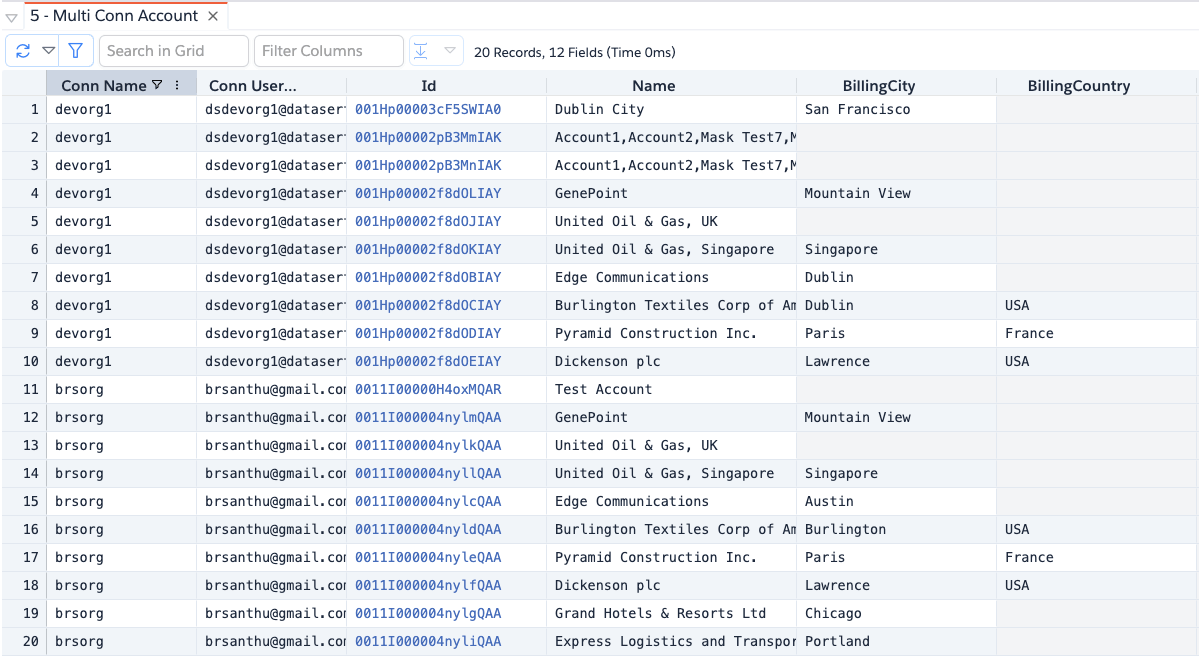
- The grid adds two additional columns
Conn NameandConn Userwhich shows the connection details - There is no
Query Moresupport for Multi Conn Query so it will fetch all records matched by the query - Record preview and view record links will work only for main connection records
- It supports Child Queries and similar to Parent Query, it adds
Conn NameandConn Usercolumns
Video Guide
Usage
-
In the query editor or query builder, author the query you want to run, highlight the query text and then click on
Execute as Multi Conn Query -
App shows the following dialog asking you to select one or more connections and click
Execute. When you launch the dialog below for the first time in a session, it will select the current connection by default. Afterward, it remembers the previously selected connections and selects them by default.
-
App shows the results in the grid with connection details
-
You can sort, filter and group the results as usual including exporting the data