Query Variables
Query Variables enables reusing a same query with different values in Where clause. Query Variable is defined
as :queryVarName, which is similar to how they’re defined in SOQL queries Apex language.
Note that Apex allows you to add space between : and variable name but Brobench parser engine doesn't support that.
For ex., : accountId is valid in Apex SOQL but is not valid in Brobench
Each Query can contain more than one variable. For
ex., select * from account where name like :name and accountnumber = :mainAccountNum
Each variable can be used multiple times ex., select * from account where name like :name or parent.name like :name
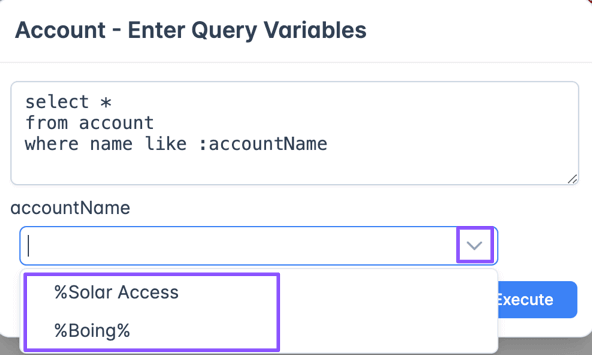
When you execute a query with variables, then a dialog will be shown to enter values. Enter the values and click
Execute to run the query and show
the results.
Query Vars in In clause
Query variables can be used in In clause. In such cases, the dialog will show the input text area. Entered text will
be split by new line, and each line is fed as a single in clause value.
For example., for given query select id, name from account where accountnumber in (:accoutNums) and entered Query Var
value of
123
456
789
then it’ll create the query select id, name from account where accountnumber in ('123', '456', '789')
Standard Query Vars
Brobench supports following standard query vars.
| Name | Description |
|---|---|
$userId | Current Salesforce connection User Id. For ex., 005UJ000006Hjq6YAC |
$userName | Current Salesforce connection Username. For ex., john.doe@example.com.dev |
$userEmail | Current Salesforce connection Username. For ex., john.doe@example.com |
$userFullName | Current Salesforce connection User Full Name. For ex., John Doe |
$orgId | Current Salesforce connection Org Id. For ex., 00DU7000005xV9nMAE |
Examples:
select Id, Name from User where id = :$userId

select * from User where email = :$userEmail
Paginated Query Vars
ProfessionalIf you’re using a variable in in clause and that query values when added to a SOQL Query exceeds maximum length of
soql, you can make use of Paginated Query Vars feature. This feature splits the values you enter into batch of 250 or so
values, queries for records, and combines the records with id match.
To enable Paginated Query Var, turn on Paginate switch as shown below.

Query Vars History
Each query var, entered value will be persisted and automatically filled next time you open the dialog with in the same session. For non-in clause variables, it also keeps history across sessions which can be recalled by the dropdown control as shown below