Managed Variables
Managed Variables let you define reusable variable values centrally, so queries with Query Variables can run without re-entering the same inputs each time.
This is useful when you frequently run the same queries across one or more connections and want consistent values.
Managed Variables can also be used in API Explorer (for example in URL path/query params/headers/body placeholders).
See API Explorer Variables for usage details.
How to Launch
- Open the
Querytool. - In the Query toolbar, click
More Actions(...). - Click
Manage Variables.
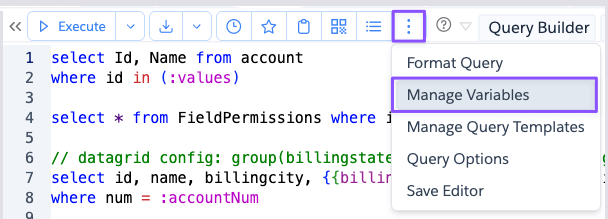
Overview
The Manage Variables dialog lets you maintain a list of reusable variables. Here is the dialog that is shown when
click on the Manage Variables action.
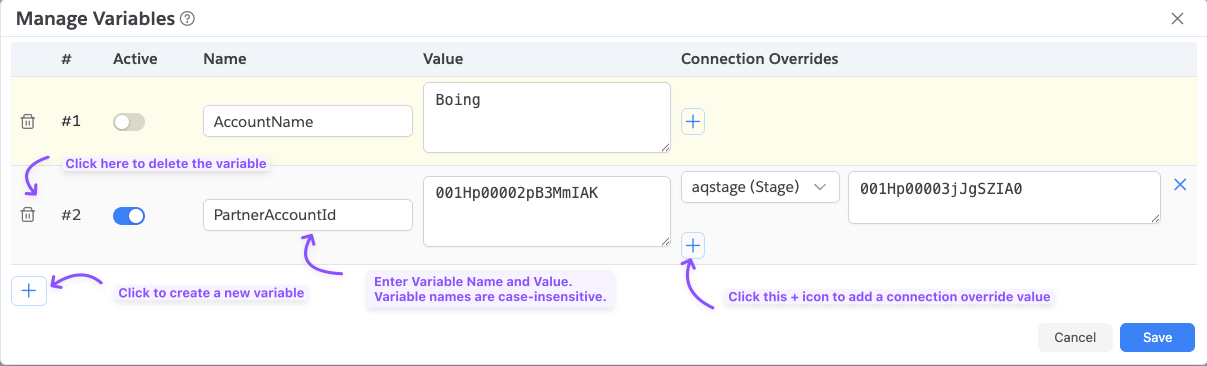
Here are the various actions in the dialog.
Active: Toggle a variable on/off without deleting it. Variable is not used when it is inactive.Name: Variable name without:. For example,accountId.Value: Default value used for that variable.Connection Overrides: Optional connection-specific value overrides.
While saving managed variables, Brobench enforces the following:
- Variable name is required when any value is provided.
- Variable name cannot start with
$. - Variable names must be unique (case-insensitive).
- Connection override with a value must also have a selected connection.
Connection Overrides
Connection Overrides lets you use different values for the same variable based on the active connection.
For each variable row:
- Click
+in theConnection Overridescolumn. - Select a connection.
- Enter the override value for that connection.
- Repeat to add multiple connection-specific overrides.
Example:
- Variable
accountIddefaultValue:001AAA... - Override for
prod@company.com:001PROD... - Override for
uat@company.com:001UAT...
When query runs in prod@company.com, Brobench uses 001PROD....
When query runs in uat@company.com, it uses 001UAT....
For any other connection, it falls back to default 001AAA....
How Values are Resolved
When a query executes, Brobench resolves managed variables in this order:
- Use matching
Connection Overridevalue if present for the current connection. - Otherwise, use the variable's default
Value.
If a variable is inactive or has no usable value, it is ignored.
Notes
- Managed Variables are intended for reuse with query variables such as
:accountId. - Standard query vars like
:$userIdare built-in and are managed separately. See Query Variables.