Split Select Fields Query
The Split Select Fields Query feature automatically handles SOQL queries that exceed Salesforce's SOQL character limit ( approximately 14,000 characters). When a query is too long, this execution mode splits the SELECT field list into multiple smaller queries, executes them in parallel, and merges the results together.
This is very helpful to query core Salesforce Objects, which tend to have lot of custom fields. For example., Opportunity or Lead.
This feature is available in the Professional edition.
How It Works
The Split Select Fields Query performs the following steps:
-
Query Analysis: If the query is already within the character limit, it executes normally without splitting.
-
Field Splitting: If the query exceeds the limit, it:
- Parses the SOQL query to extract all fields from the SELECT clause
- Groups fields into batches such that each resulting query stays under the SOQL character limit
- Ensures the
Idfield is included in each split query (adding it if not already present) to enable result merging
-
Parallel Execution: All split queries are executed in parallel to maximize performance.
-
Result Merging: Results from all split queries are merged together based on the
Idfield, combining all fields from different queries into a single result set.
How to Execute
To execute a query using Split Select Fields Query:
- Enter or select your query in the Query Editor
- Click on the dropdown arrow next to the
Executebutton - Select
Execute as Split Select Fields Queryfrom the menu
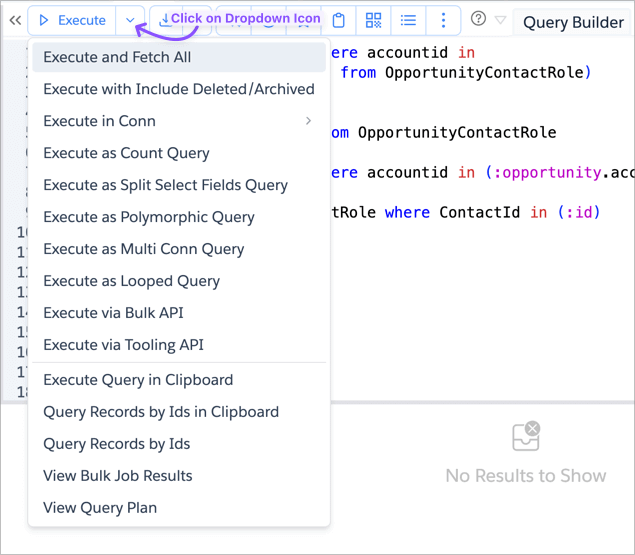
The query will be automatically split if needed, executed in parallel, and the results will be merged and displayed in the Query Results tab.
Status Indicators
While the query is executing, you'll see a status message indicating progress:
Executing Split Select Fields Query [Completed X of Y parts...]
This shows how many of the split query parts have completed execution.
Important Notes
- If your query is already within the character limit, it will execute normally without splitting
- The
Idfield is automatically added to each split query if it's not already present, ensuring proper result merging - All split queries maintain the same WHERE, ORDER BY, and other clauses from the original query
- If even a single field query exceeds the maximum SOQL length, the operation will fail with an error
- The feature requires that the query can be parsed and fields can be extracted from the SELECT clause
- Results are merged based on the
Idfield, so queries without an identifiable Id field may not merge correctly